Showing posts with label Hardware. Show all posts

Sunday, July 24, 2011

Important Breakthrough in Quantum Computing

Scientists from the USC College of Letters Dornsife completing an important breakthrough in quantum computing, in the form of the use of machines to revolutionizequantum information processing.

Susumu Takahashi, an assistant professor of the USC College of Letters Dornsife, Arts and Sciences, and colleagues used high-strength magnetic fields to suppressdekoherensi, which is one obstacle in quantum computing.

"High-strength magnetic field reduces the level of interference (noise) in the vicinity,which can suppress dekoherensi very efficient," said Takahashi. Dekoherensi beentouted as a "quantum bug" that undermine the basic property that became the mainstay of quantum computers.

Quantum computing uses quantum bits, or qubits, for encoding information in the form ofzero and one. Unlike a traditional computer that uses the traditional bits, quantumcomputers are almost impossible to implement the fact that the qubits can appear in many conditions simultaneously, which is called "superposition."

While a bit can only represent a zero or one, a qubit can represent zero and onesimultaneously because of the superposition. This allows simultaneous processing ofcalculations in parallel systems. Although the concept of computer computing support is no longer new, but things like dekoherensi impede the full implementation of quantumcomputing.

In this study, the scientists dekoherensi mengalkulasikan all sources such astemperature, magnetic field, and with the nuclear isotopic concentrations, and consider the optimal conditions for operating the qubits, can be suppressed dekoherensi about 1000 times.

"For the first time we can predict and control all the mechanisms dekoherensi in a verycomplex system - in this case the magnetic molecules very much," said Phil Stamp,Professor of Physics and Astronomy at USC and Director of Pacific Institute ofTheoretical Physics. (Source: Physorg)

Saturday, July 23, 2011

Logitech Speaker Lapdesk N550


Speakers that comes with stereo sound can deliver clear sound with a compact size fornotebook users. Logitech Speaker Lapdesk N550 is lapdesk comfortable in bringingcinema-class entertainment experience in all activities. As the successor of the N700Lapdesk Logitech Speaker who had already been popular, the N550 is designed for laptops measuring up to 14 inches. Logitech Speaker Lapdesk N550 answer two biggestcomplaints are often experienced by notebook users, the poor audio quality and heat in the body of the notebook. So the presence of Logitech Speaker Lapdesk N550 is able to overcome both problems.


Logitech Speaker Lapdesk N550 menggunakan stereo yang ditempatkan secara presisi di kedua sisi laptop untuk menghasilkan suara stereo yang kaya. Empat lapis peredam digabung dengan bahan penyaring udara yang lembut. Posisi atas N550 yang bersudut mampu menempatkan pengguna dengan posisi yang nyaman, sementara bumper lipat di permukaan lapdesk memantapkan posisi notebook. N550 tanpa memerlukan perangkat tambahan yang memanfaatkan daya notebook untuk memberi daya ke speaker melalui sebuah port USB. Logitech Speaker Lapdesk N550 akan hadir pada akhir Juli 2011 dengan harga pasaran Rp 515.000,-. (@chip.co.id)

First Mainboard with AMD Chipset Series-9

MSI introduces the latest product Mainboard MSI 990FXA-GD80 and GD65-990FXA.Both of these products is the latest motherboards with AMD chipsets that support the9-Series Native Octa-core AMD AM3 + CPUs.

990FXA-GD80 mainboard products that enter the high-end focus on two product excellence that is a component Military Class II certified MIL-STD-810G and OC Genie IItechnology. This product is according to MSI, suitable for the overclockers, the gamingenthusiast, even users mainboard for entry-level.

Features offered on the product MSI mainboard 990FXA-GD80 and GD65-990FXAThese include:


Supports NVIDIA SLI and AMD's CrossFireX Multi-GPU processing so as to improve the performance of 3D game impressions and multi-display capabilities.
USB 3.0 and native support for SATA 6Gb with an increase in file transfer speeds.
Technology TruStudio Pro THX Surround sound.(@infokomputer.com)

Thursday, November 11, 2010

QinMake - Cara Kreatif Bikin AC yang Inovatif


Semenjak Global Warming melejit "kepasaran" Dunia serasa semakin PANAS, bayangkan saja buat di kota Padang suhu tertinggi tercatat mencapai 35°C (Lebayyyy).

Nah masalahnya sekarang buat mahasiswa yang berkantong tpis harus rela berpanas-panas ria di kamar durjananya.. hhehe…karena apa daya gak kuat beli AC ato daya Listrik kurang buat pasang AC….*situasi makin panas nih!!!...


JANGAN MENYERAH! Ayo putar otak, cari solusi untuk dapetin suasana dingin kita kan mahasiswa, harus Think Inovatif.!!!

Uups… setelah browsing sana-sini, akhirnya nemu tutorial bikin AC sederhana. Murah meriah, cuma perlu kreativitas aja kok!

Don't Worry guys, be happy. Bagi kamu yang punya Kipas Angin ( Fan bahasa kerennye).. Bisa dijadikan sebagai Server untuk mendinginkan ruangan dan kamu sebagai client yang untuk didinginkan... (Bahasa anak TI-nya lho!!!) Untuk itu jangan lama-lama. Markitkem (Mari Kita Kemon) hehehe....


OK kita mulai deh…
"Pakakeh" (Bahan-Bahan)" :
>>Kipas angin rumah (Stand/Duduk) ukuran agak besar/seadanya.
>>Cooper Tubing/Pipa Tembaga ukuran 3/16″ panjang terserah. (Beli di toko AC/Perlengkapan AC, Tukang Service AC) Rp 8000 – Rp 13.000/meter
>>Cable Ties secukupnya
>>Pompa akuarium kecil (Beli di toko akuarium) Rp 45.000 – Rp 65.000/pcs
>>Pipa plastik 3/16″ beli di toko bangunan. Harga -
>>Tandon air (Termos Es) Bisa pake stereofoam bekas tempat ikan.

ESTIMASI PENGELUARAN
HANYA!!!Rp. 100.000,-

Harga tidak termasuk Kipas Angin, peralatan tambahan, dll

Langkah-langkah!


1. Siapkan kipas angin dan copper Tubing
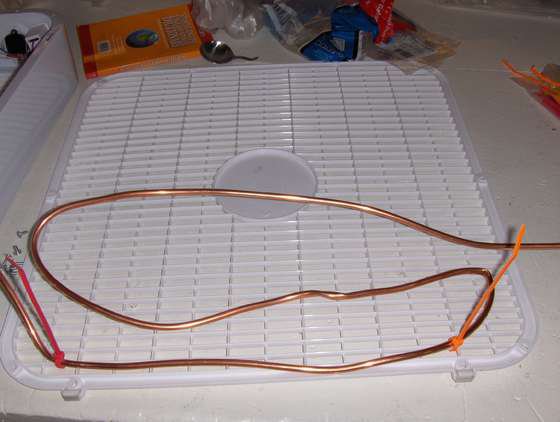
2. Lilitkan copper tubing di depan kipas angin.
Usahakan Pipa jangan sampai TERTEKUK/PATAH !


Kencangkan ikatan Pipa menggunakan tali Ties
Kalau pas dapat pipa yang ukurannya beda, bisa dikencangkan dengan menggunakan klem. Maksudnya agar tidak bocor.


3. Sambungkan pipa tembaga dengan pipa plastik

Tinggal sambung aja ga perlu repot
4. Siapin pompa akuarium. cek mana inlet mana outlet. Terserah mo pake yg sebelah mana.

Biarkan ujung yang lain bebas. Untuk masuk/keluar air


Nah sekarang, saatnya buat uji coba hasil besutan kita….
Isikan air dingin di Tandon air/Termos Es. Kalo perlu tambahkan ES balok biar dingin!

AC sederhana siap bertugas mendinginkan suasana! Wuihh sueejuukk.
Selamat mencoba.
Prinsip kerjanya begini nih bro, sederhana aja kok!
- Air dingin yang dipompakan ke pipa tembaga menyebabkan pipa tersebut menurun suhunya. Sesuai prisip kondensasi.
- Suhu dingin di sekitar pipa dihembuskan oleh angin dari kipas.
- Secara teknis suhu angin keluar dari kipas lebih dingin dari pada suhu ruang.

Maka, dingin deh ruangannya… Its simple!
Cocok buat kamar yang tertutup (seperti halnya AC agar dingin ruangan tetap terjaga dan optimal).

 
Design by Free WordPress Themes | Bloggerized by Lasantha - Premium Blogger Themes | cheap international voip calls